WiFi Guest Access1.3
Publisher Description
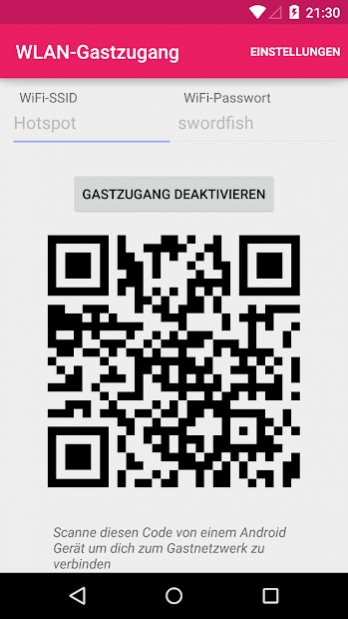
This app lets you quickly enable or disable the WiFi guest network of your Fritz!Box router.
The guest network is a second network, which can use a different name and password than your primary WiFi network. Also, devices connected to the guest network can not access the devices on the private primary one.
The guest network is useful for providing wireless internet access to someone, without revealing the personl WiFi password and granting access to all private devices on the network.
Your Fritz!Box router has to support the WiFi guest network feature and your Android device must be connected to the private Fritz!Box WiFi network to be able to change the guest network state.
This app is open source: https://github.com/j4velin/WiFiGuestAccess
The app is currently not yet compatible with Fritz!OS 7!
The app or this account is not related to the AVM GmbH in any way.
About WiFi Guest Access
The company that develops WiFi Guest Access is j4velin. The latest version released by its developer is 1.3.
To install WiFi Guest Access on your Android device, just click the green Continue To App button above to start the installation process. The app is listed on our website since 2019-01-18 and was downloaded 7 times. We have already checked if the download link is safe, however for your own protection we recommend that you scan the downloaded app with your antivirus. Your antivirus may detect the WiFi Guest Access as malware as malware if the download link to de.j4velin.gastzugang is broken.
How to install WiFi Guest Access on your Android device:
- Click on the Continue To App button on our website. This will redirect you to Google Play.
- Once the WiFi Guest Access is shown in the Google Play listing of your Android device, you can start its download and installation. Tap on the Install button located below the search bar and to the right of the app icon.
- A pop-up window with the permissions required by WiFi Guest Access will be shown. Click on Accept to continue the process.
- WiFi Guest Access will be downloaded onto your device, displaying a progress. Once the download completes, the installation will start and you'll get a notification after the installation is finished.
Program Details
System requirements
Download information
Pricing
Version History
version 1.3
posted on 2019-01-18
1.3: add (experimental) support for FRITZ!OS 7
1.2: fixed reported crash
1.1: fixed HTTP parameter names for older Fritz OS versions
1.0.9: keep other WiFi Guestmode settings as they are
1.0.7: changed text type in login dialog to "password"
1.0.6: adjustment for new Fritz OS version
1.0.5: fixed issue with special characters in SSID
version 1.2
posted on 2017-01-28
1.2: fixed reported crash
1.1: fixed HTTP parameter names for older Fritz OS versions
1.0.9: keep other WiFi Guestmode settings as they are
1.0.7: changed text type in login dialog to "password"
1.0.6: adjustment for new Fritz OS version
1.0.5: fixed issue with special characters in SSID
version 1.1
posted on 2016-03-28
1.1: fixed HTTP parameter names for older Fritz OS versions,1.0.9: keep other WiFi Guestmode settings as they are,1.0.7: changed text type in login dialog to "password",1.0.6: adjustment for new Fritz OS version,1.0.5: fixed issue with special characters in SSID
